
1.5.7 - Mirror objects - Basic
With the mirror command, you can flip one or more objects about a specified axis to create a symmetrical symmetrical image or images.
Mirroring is useful to create symmetrical objects, because you can quickly draw half the object and then mirror it instead of drawing the entire object.
Begin the mirror command via Ribbon.
- On Ribbon
 ► Click Home tab►Modify panel ► click Mirror
  icon ( Fig. 1.4.7.1) .
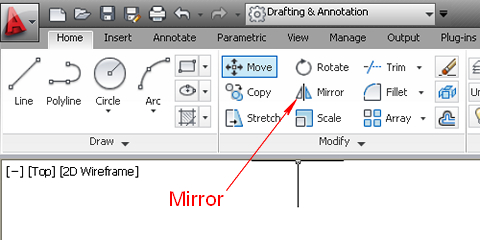
Fig.1.4.7.1 - Ribbon - Mirror tool
To mirror the door around the axis P1P2, as shown in Fig. 1.4.7.2 :
- Command Line prompt says:Select object: With the mouse Select the drawing of the door you want to flip about the axis P1P2, and press ENTER.
- Command Line prompt says:Specify first point of mirror line : With the mouse ,select the point P1 and point P2 to define the line P1P2 as the axis of mirror, and press ENTER.
- Command Line prompt says:Erase source objects? [Yes/No] :Type N if you want to keep the original object, and press ENTER.
You have created a symmetrical image of the door drawing, about the axis P1 and P2 ,as shown in Fig.1.4.7.2.
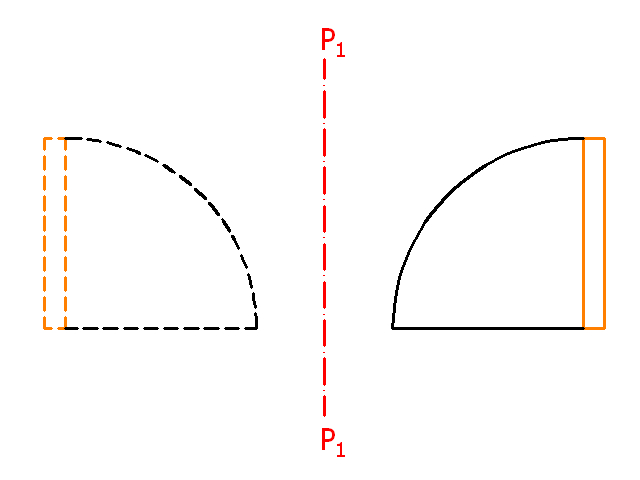
Fig.1.4.7.2 - Mirror Object